Desert Online General Trading LLC
Dubai, United Arab Emirates
Desert Online General Trading LLC
Dubai, United Arab Emirates


🚀 Elevate Your Game and Workflow with One Key!
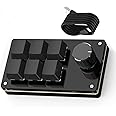
The SIKAI CASE Programmable Macro Keyboard is a versatile 6-key mechanical keypad designed for gamers, designers, and professionals. With hot-swappable switches and USB-C connectivity, it allows for seamless programming of shortcuts and macros across multiple operating systems, enhancing productivity and gaming performance.


| Hand Orientation | Ambidextrous |
| Button Quantity | 6 |
| Is Electric | Yes |
| Power Source | USB |
| Compatible Devices | Gaming Console |
| Connectivity Technology | USB-C |
| Special Features | Hot-Swappable |
| Number of Keys | 6 |
| Style | Modern |
| Theme | Gaming and Office |
| Color | Balck |
| Material | Acrylonitrile Butadiene Styrene |
T**A
Using this for DaVinci Resolve and works great!
Okay, so as the title states, I’m using this for DaVinci Resolve. I’m not about to spend hundreds of dollars to simplify the few shortcuts I often use when editing. Despite the below average reviews, I decided to give it a shot for under $20. I’m glad I did.The main thing I wanted was to have a knob for scrolling through the timeline and all these macro pads never make it clear if you could configure it that way. It’s always just mentioned as a volume knob or music controller. But I can happily confirm that it does work as a timeline scroller.Having six keys should be enough for most of your commonly used functions while editing. Personally I have them set for Shift, Alt, Copy/Paste, and Snapping. I still have an extra open key and I’ll probably adjust some macros down the line.And setting the macro function is easy enough. A lot of reviews complain about finding the software but the URL link is in the included manual and product description here on Amazon.Here is a simple explanation of how to setup the keys. When you open the program, on the left side you’ll see KEY1, KEY2, etc. If you have the macro pad positioned on your desk so that the knob is on the right, KEY1 will be the top left key. KEY2 is top middle key, and so on. So just count it from top left, all the way right. Then bottom left, all the way right.To set a key/macro, first choose the type from the list under the KEY boxes. Then select the KEY you want to set it to and it’ll turn red. Then select the keystroke(s) and when you’re done, hit “download”. It might take a few tries to understand how it’s setting up the keystrokes but it’s fairly simple.As for the knob, this is how to set it up for timeline scrolling on DaVinci Resolve. First off, to the right of the KEY boxes you’ll instead see K1, K2, etc. boxes. K1 Left is turning the knob counterclockwise. K1 Center is pressing down on the knob. K1 Right is turning the knob clockwise. So first click on the “mouse” option from the list on the left. Then select K1 Left and it’ll turn red. Next select the “Ctrl + Mouse Wheel Up” keystroke option, then download. This lets you scroll to the left. Do the same for K1 Right but choose “Ctrl + Mouse Wheel Down”. This lets you scroll to the right. For K1 Center you can choose whatever else you need. If you want to set a keystroke, then click KEY on the list first, then click K1 Center so it turns red, then select your keystroke.I know that’s a lot of explaining but trust me, it’s really simple once you mess around with it.So, for the actual macro pad itself. Build quality seems really solid. It’s extremely light, but I’d prefer a little more weight to it. It comes with optional rubber feet you can stick on the bottom so it doesn’t slide around. Keystrokes are soft and it’ll take getting use to since I prefer my clicky switches. The knob has little detents when you turn it, but feels smooth. Pressing down on the knob has a very solid and responsive click to it.So overall, I’m loving this macro pad and glad I gave it a try even with the low rating. Now obviously I can’t attest to longevity but for now it’s a great option for editing on Resolve or whatever else simple macro functions you may need.
M**.
Perfect for if you're a digital artist on a budget; The software sucks, though.
I was contemplating on whether I needed a TourBox or a macropad for my digital art needs; I ended up going with this since:1. As far as I'm aware, there's no left-handed TourBox (outside of the Lite, but it's not truly left handed still.)2. There was an old keyboard that I had that featured macro buttons on the side; Last I remember, it was a Logitech G910.With this, I found myself rotating, flipping, and just panning and moving around the canvas both very frequently and very easily in something like GIMP or Krita, so it made a ton of sense to bind the rotate canvas buttons to the knob; it works out perfectly. I only have one problem though; the software is so counter-intuitive to the point I had to find an alternate version of something capable of using this nifty little gadget.Interestingly, I found that even though it does seem capable of backlight, there's none built in. That's okay, though; I can still hot-swap the keys; the switches mine came with were some basic Red Kailh box-types.So, in short: Amazing for something like digital art, but I think the software it comes with needs a massive overhaul.
N**N
It works if you find the right software
I wanted a volume knob and a few macro keys, which was hard to find at a reasonable price. This achieved that, and after reading some comments because the software wouldn't connect (windows 11) I found the legacy software and was able to program the buttons and knob one at a time. It does exactly what I need it to do. I haven't had any issues with it yet. My only requests would be to improve the software to allow for F13-F24 keys, and to allow customization of the knob to adjust volume faster. The knob's rotation has feedback (it's not smooth or free spinning, more like clicks) on each actuation of whatever you assign or to, and for volume it adjusts the volume 2 increments at a time. To adjust the volume from 0 to 100 it takes many turns. I'm still happy with it, and for under 20 US it's a bargain.
H**Y
Worked well till it died
I used this for 2 months and it worked well. Then it just suddenly stopped working. I tried switching the cords and using different USB ports and it did not work.The program to set the hotkeys was easy, the dial though isn't as responsive as you'd want it to be. If you turn the dial "too fast" as in not 1 click at a time, it wont register.Maybe it was just my device, but since it stopped working I'd probably pass on buying another one.
M**E
Video editing
With a little modification I now have a dirt cheap video editing keyboard to use on Davinci Resolve.
R**T
Once set up works fine
Complicated process to get working correctly and it needs to be programmed separately for every game otherwise all the buttons equal C
G**_
Great for macros and multimedia
I love this little thing. Once I got the software up and running and set up my macros it works amazing. The software might be a bit confusing but once you get used to it, it works surprisingly well. It does feel a bit cheap and hollow but that the least of my worries since don’t haven’t moving around or anything. I put my own switches and my own key caps and it looks great. The price is unbeatable in my opinion for what it does.
A**L
Works I guess, but not worth your time.
Technically works, but the software to set it up is not intuitive, and also has some red flags for being a virus. Hardware itself is nice and clicky, but the risk of virus + the pain it is to set it up is not worth it and you should probably spend a little bit more money to get a nicer name brand one that you can trust.
Trustpilot
1 month ago
2 weeks ago