We remain fully operational. Our teams are working around the clock to ensure your deliveries continue safely.

DOWNLOAD THE APP


Copyright © 2025 Desertcart Holdings Limited
DOWNLOAD THE APP


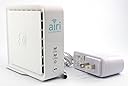

New AT&T Air 4920 in a sealed original box. Review: Easy to Set Up and Reliable - AT&T Air Ties signal extenders are well worth the investment and a great value. Setup has never been easier. Simply plug the extender into an outlet close to your router. Press the WPS button on the router and then do the same with the extender. After about 2-3 minutes, the devices are synced. Then simply unplug the extender and place it elsewhere in your home. If you are an AT&T customer, there is also an app that you can install on your phone which will determine if you need an extender for your home. If your home is very large, it will also recommend how many extenders you will need. These extenders are also "mesh" extenders. This means that if the Wi-Fi signal fluctuates throughout the home, the extenders will negotiate which one takes the main control of signal. The result is a seamless Wi-Fi signal as you move through the home or office. They also extend both 2.4GhZ and 5.0Ghz signals. If your home has "dead spots" or is larger than 1800 Sq.Ft. or so, these extenders are definitely a must. Review: Doesn’t work - Terrible I’m in process of returning it
| ASIN | B072M2DJXC |
| Best Sellers Rank | #195 in Repeaters |
| Brand | AirTies |
| Built-In Media | Power adapter, Instruction manual |
| Color | White |
| Compatible Devices | Router |
| Connector Type | RJ45 |
| Customer Reviews | 3.7 3.7 out of 5 stars (880) |
| Data Transfer Rate | 1000 Megabits Per Second |
| Frequency Bands Supported | 5 GHz |
| Item Dimensions D x W x H | 4.27"D x 1.63"W x 3.94"H |
| Item Weight | 0.94 Pounds |
| Manufacturer | AirTies |
| Range | 1500 feet |
| Special Features | WiFi Mesh |
| UPC | 040003317149 |
| Wireless Compability | 802.11ac |
J**S
Easy to Set Up and Reliable
AT&T Air Ties signal extenders are well worth the investment and a great value. Setup has never been easier. Simply plug the extender into an outlet close to your router. Press the WPS button on the router and then do the same with the extender. After about 2-3 minutes, the devices are synced. Then simply unplug the extender and place it elsewhere in your home. If you are an AT&T customer, there is also an app that you can install on your phone which will determine if you need an extender for your home. If your home is very large, it will also recommend how many extenders you will need. These extenders are also "mesh" extenders. This means that if the Wi-Fi signal fluctuates throughout the home, the extenders will negotiate which one takes the main control of signal. The result is a seamless Wi-Fi signal as you move through the home or office. They also extend both 2.4GhZ and 5.0Ghz signals. If your home has "dead spots" or is larger than 1800 Sq.Ft. or so, these extenders are definitely a must.
A**R
Doesn’t work
Terrible I’m in process of returning it
C**Y
Worked great for me.
I’ve been disappointed with the wi-fi range of my AT&T modem. I can connect to my across-the-street neighbor’s wi-fi (they gave me their password) but barely get a signal from my AT&T modem in the upstairs bedroom. This extender solved my problem. Just connect the internet cable between the two devices and turn the extender on. After about four minutes of communication between them the range was seamlessly extended. I was expecting to have to connect to a different wi-fi device with a different password. But when connected to the AT&T modem you continue to use the same wi-fi name and password. Cool. For me the this was more easily said than done. Stringing the internet cable and power extension cord through the attic was quite a job. I strongly suggest you figure out where you will site this before purchase. I happened to have some devices that extend the wired internet connection through the house wiring. This would have made setting up this extender really easy. It actually worked but also slowed down the connection. So I made the connection with a long internet cable. A short internet cable was included in the box. Okay for testing. But you’ll need a longer cable so you can place the extender far away from your modem. There were no instructions included in the box but a PDF can be found online by Googling the model number. BTW, the device was a lot smaller than I was expecting. Not that it matters.
G**C
Don’t use the WiFi App!
Bought the 4920. It’s complete rubbish. I have AT&T U-verse and it will not find the node on my network. I downloaded the app and saw that every single reviewer had the same issue. Update: so I decided to try the instructions on the website and it installed perfectly. The lesson is: don’t follow the instructions included with the packaging, as those instructions direct you to download the AirTies Wi-Fi app. The app does not work. Just use the instructions available on the web, which don’t even require you to use the included ethernet cable. As far as I can tell, the device seems to be functioning properly. So on that basis it’s probably worth at least a four star review for functionality. And zero stars for installation instructions and Technical Support (which does not exist).
S**R
Works Well But AT&T Can (and Did) Pull Support for It 3 Months After Recommending it as an Upgrade
I purchased this extender when AT&T decided to drop its support of the extender I had purchased from the company. This extender was the one recommended by AT&T as an update (AT&T tried to rent it to me but I bought it from Amazon instead). The extender worked well but 3 months after buying it as the recommended extender, AT&T dropped support of it, once again trying to get me to rent yet another upgrade. The problem thus is not with the extender but with AT&T, which apparently is trying to get people to subscribe and therefore charge people more long-term for its service. I would have ranked the product's performance as a 4 and it's shelf life as a 1. I compromised and gave it a 3. AT&T cannot be trusted to do what is best for its customers, so I will be looking for a different provider, though of course one cannot be sure how trustworthy the other carriers are. Good luck to all of us as we manage through our Internet addictions and the carriers who prey on us.
R**Y
Easy setup, great signal booster!!
Received it today. Ran through the install using the AT&T Smart Home Manager and could not get it to pair. Ended up connecting the Ethernet cable to the router and it paired. Then disconnected it from the router, moved it to the living room, abt 35’ away. It’s working and I now have superb WiFi strength on the back patio near the pool! Prior, I had low to no signal. Very pleased!! AT&T wanted to charge me $10/month for an extender, so this is a bargain!
M**T
Words great and it's simple to hook up especially for Smart TV
The Airtie is great. I live in a converted garage in my landlord's backyard (30 feet away). The pairing was simple. I looked at some of the online directions and ended up ignoring them. I took my Airtie into my landlord's house plugged into power placed it next to the gateway and pushed the WPS buttons on each. They paired very quickly. I then unplugged from power the Airtie took it to my place plugged it in and hooked it up to my smart TV with an ethernet cable. It works great. My computer and phone always worked OK off the wifi, not so my smart TV. Streaming was often interrupted. If the power went off for any reason my smart TV wouldn't reconnect on wifi for days sometimes. Now I have no problems at all. I've already ordered a new cable to hook up my laptop just to get the better connection my TV now has. I'm very happy with my Airtie.
Trustpilot
2 days ago
2 months ago